As what i've said before, flowcharting is really a big help in program development. It can make a better output program since you have a guideline that you followed. Using a flowchart can minimize the time that you will utilize.
There are still things that I want to learn in flowcharting. I still want to know other designs or structure that can be use in flowcharting, the other uses of the flowchart symbols and in the other uses of flowchart. I also wanted to learn more techniques that can be used in flowcharting. To know more about it, i should explore the nature of flowcharting.

As we started our discussion on computer programming, we need to discuss first the step by step process to do this. In making a program, we need to follow a cycle. We call it program development cycle.
The first thing to consider is the review of programming specifications. Before we solve a problem, a complete knowledge a bout the problem must be provided.
The next step is the program design. Before you do the program, a design is needed to serve as a guideline to your work. It can result to better output and can minimize the time that will be used. The design can be illustrated by the use of a Flowchart.
Flowchart is a graphic representation of the successive steps in a procedure or system which usually uses symbols that are interconnected with lines to show sequence or process. It is a diagram that illustrates the sequence of operations that will be performed to get the solution of a problem. Flowchart is helpful in explaining program to others while playing a vital role in understanding the logic of complicated and lengthy problems.
Flow charting is a tool for analyzing processes. It allows you to break any process down into individual events or activities and to display these in shorthand form showing the logical relationships between them. Constructing flowcharts promotes better understanding of processes, and better understanding of processes is a pre-requisite for improvement.
uses of flowchart:
1. it serve as an efficient means of communication.
2. it serve as an analytical tool.
3. it is a concise form of documentation.
common flowchart symbols

terminal symbol - to indicate the beginning and end of the program flowchart.
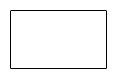
process symbol - use to indicate instructions that performs manipulation data.
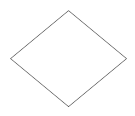
decision symbol - used to test conditional statement.

on page connector - used to connect parts on the program flowchart written on the same page.
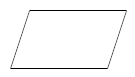
input/output symbol - used to indicate input and output activity.
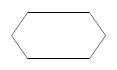
initialization symbol - used to define intermediate storage areas to be used in the flowchart.

pre defined process symbol - used to indicate a transfer of control from the main flowchart to a sub-routine.
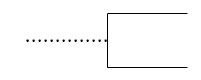
annotation symbol - used to insert remarks and comments.

off page connector - used to connect parts of the program flowchart which extends over several pages.
flow charting is really important in making a program. it is really necessary to have it before starting a program. it will help in minimizing the time and make your work easier. it will serve as your basis or guide for your project.